Data Answers
What are Data Answers?
A Data Answer is what you get when you ask Mantra a business question in natural language. It is everything Mantra produces to answer that question. That includes the answer you read, as well as the work and verification behind it.
Every Data Answer is made up of four parts:
| Part | What it is |
|---|---|
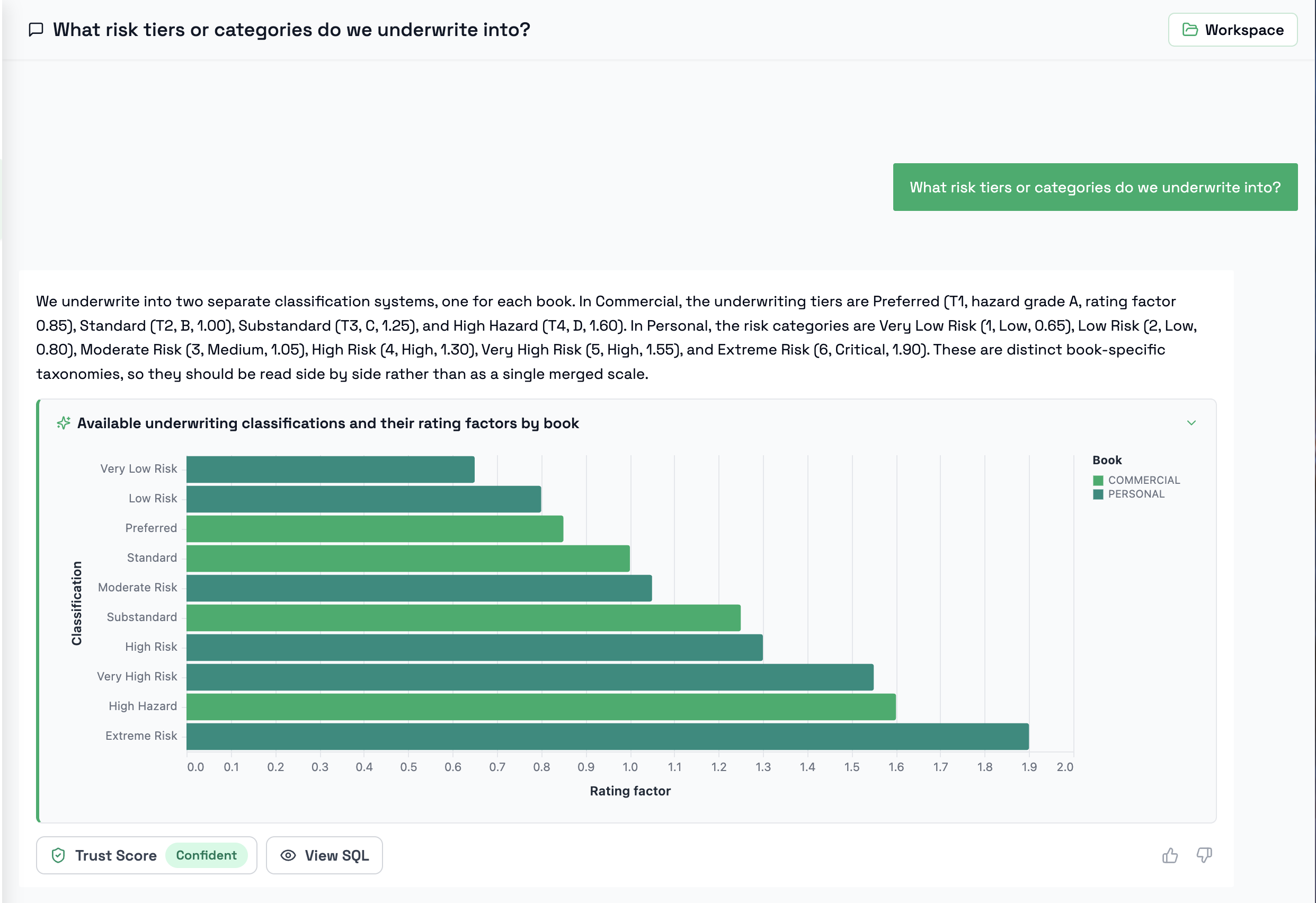
| Insight | The answer to your question, shown in the conversation: a narrative, plus a chart or grid when that presents the data better. |
| Reasoning | How Mantra interpreted your question and worked out which data and business context apply to it. You'll find it in the Trust Score report. |
| SQL | The query Mantra generated and ran against your data to produce the Insight. |
| Trust Score | An independent assessment of how well the answer is backed by your business context and data. |
The Insight is the part you see first and the part most people act on. The Reasoning, SQL, and Trust Score are what make it reliable. They show how the Insight was reached and how much verified context stands behind it.
The Insight is one component of a Data Answer, not the whole of it. An Insight on its own tells you what the answer is; the full Data Answer also tells you how it was reached and how far you can rely on it.
How Mantra produces a Data Answer
- Reasons through the question. Using the context in the 360° Context Hub, Mantra works out what your question is really asking about and which data covers it.
- Queries the data. Mantra builds a query against the data it discovered and runs it for you.
- Delivers the Insight. Based on your question and the results that came back, Mantra writes a narrative and decides whether a chart or a grid would present the data better.
- Scores the answer. Mantra independently verifies the answer against your business context and data, and assigns a Trust Score.
If your question is ambiguous in a way that would change the answer, such as which entity you mean, which time period, or which definition of a metric, Mantra asks you to clarify before answering. Your answers are remembered, so you won't be asked the same thing twice.
The Insight
Every Insight includes a narrative: a plain-language answer to your question. Depending on the question and the data returned, Mantra may also include a chart or a grid:
| Insight format | When you'll see it |
|---|---|
| Narrative | The answer is best given in words, such as a single figure, a yes/no, a short explanation, or a handful of values. |
| Narrative + Chart | The data has a shape worth seeing, such as a trend over time, a comparison across categories, or a distribution, and the full result can be shown clearly in a single chart. |
| Narrative + Grid | You need to see the records themselves, or there is more data than a chart can show clearly. |
Charts and grids always present the complete result of your question. A chart is only used when it can show all of the data in a readable way; when there is too much data for that, Mantra uses a grid instead.
Grids are paginated. The first page appears in the conversation, and you can page through to the end of the result.
Asking for a different format
You don't need to ask for a particular format. Mantra picks the one that best fits. If you'd prefer something different, just ask. For example:
- "Show that as a table"
- "Make that a line chart"
- "Chart this by month instead"
When the narrative covers part of the data
When a question returns a large amount of data, the narrative may be based on a subset of the results rather than every row. When this happens, Mantra states clearly that the narrative does not cover the complete dataset.
The chart or grid alongside it still shows the full result.
When the narrative says it is based on partial data, check the grid before relying on totals, rankings, or "all" and "none" statements, or narrow your question (for example, by time period, region, or top N) so the narrative can cover everything.
Looking behind the Insight
Below each Insight in the conversation you'll find:
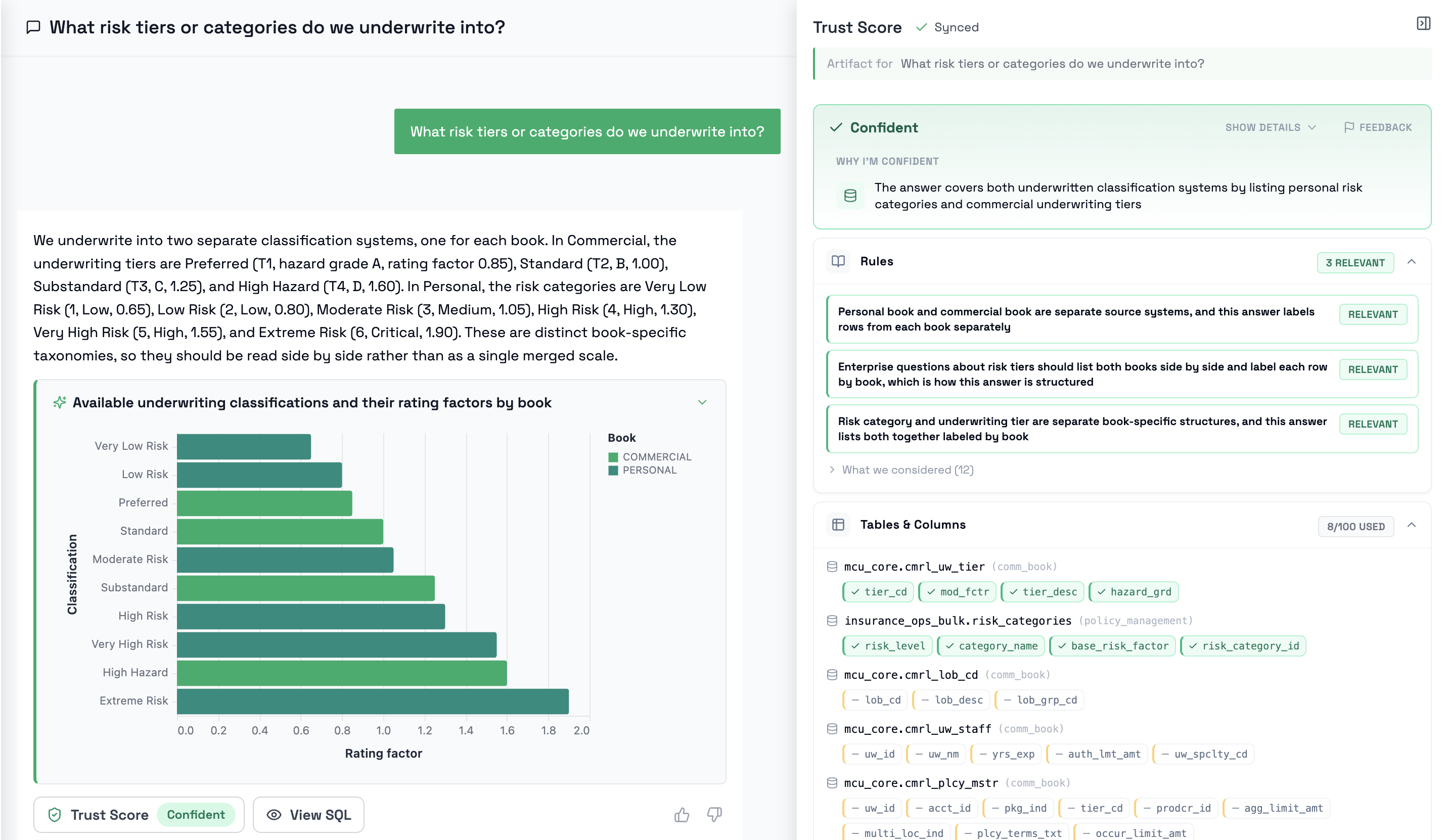
- Trust Score: the score for this Data Answer. Select it to open the full report, which includes Mantra's reasoning. This is the place to go when you're asking "Is this answer right?" or "Why should I trust this result?" See Trust Score.
- View SQL: the SQL Mantra generated and ran to produce the Insight. Select it to see the query and run it to view the raw data it returns.
- Feedback: thumbs up or down to tell Mantra whether the answer was useful.
Selecting Trust Score or View SQL opens the Workspace alongside the conversation, at the relevant tab. You can also open it at any time with the Workspace button at the top of the conversation.
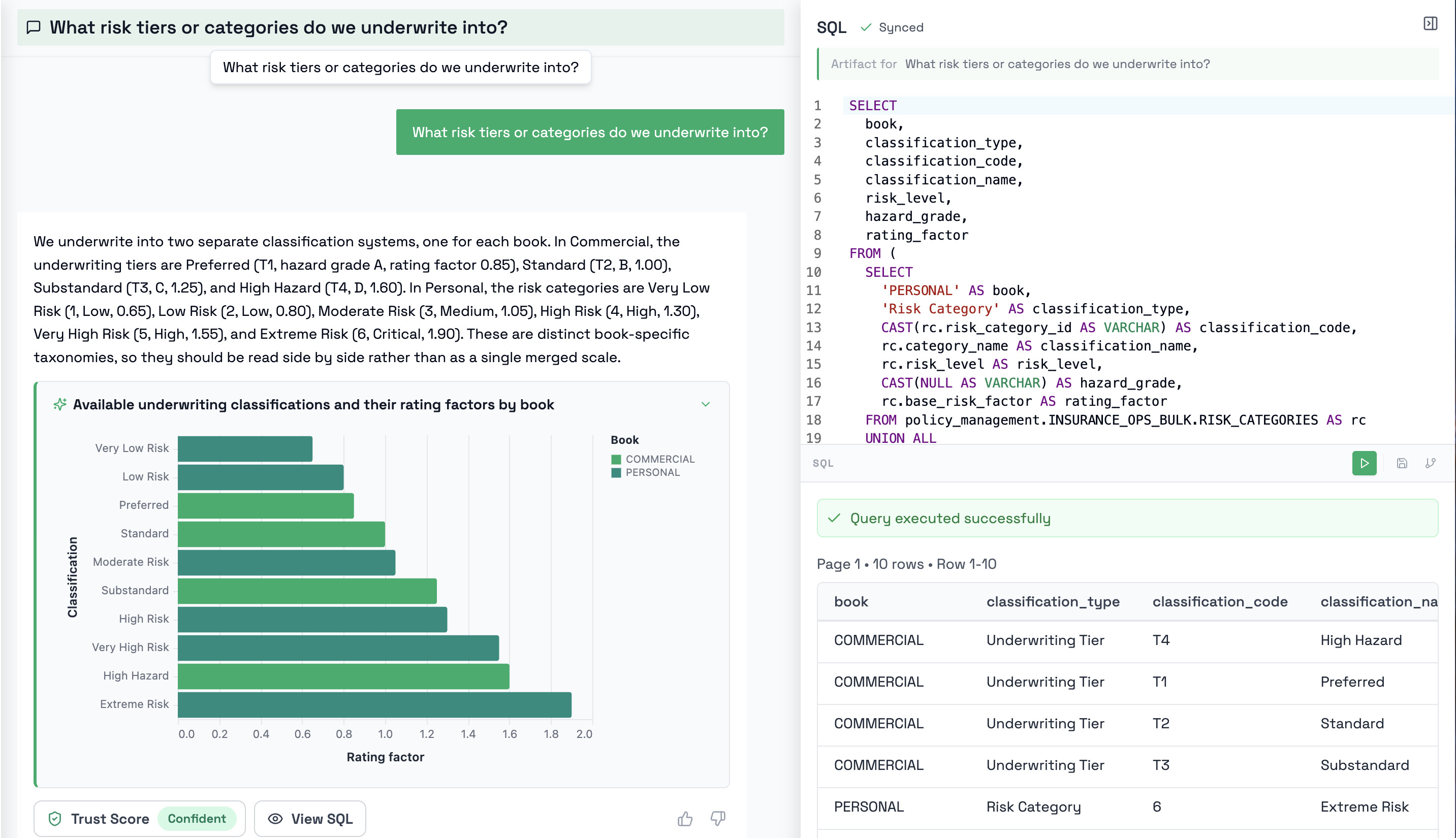
If you want to go further and modify the SQL yourself, see Workspaces in the Datamaps section.
When Mantra can't answer
If your question can't be answered from the available data (for example, no table covers the concept you asked about), Mantra says so plainly rather than producing an unreliable Insight, and the trust score report explains what was found and where the answer stalled.
Related Topics
- Trust Score: How each Data Answer is independently scored
- Workspaces: Modify and run the SQL behind a Data Answer
- Datamaps Overview: Save a Data Answer's SQL as a reusable Datamap
- 360° Context Hub: The business context Mantra uses to answer